Settings
You don’t need to change any settings to play. The settings help you narrow down the cause when something looks wrong.
Change a setting in the settings file
The patch reads its settings from K1DriverCompat.ini, in the same folder as swkotor.exe. The
patch creates this file the first time it runs, with every setting listed, explained, and
commented out.
- Open
K1DriverCompat.iniin a text editor. - Find the setting you want, and delete the
#at the start of its line. - Change the value, and save the file.
- Start the game.
The file has one setting per line:
look=ati
log=debug
The patch ignores blank lines and lines that start with #. You can write setting names and
the values on and off in any capitalisation, but the value of look must be lowercase. If a
line has a mistake, the patch still reads the rest of the file.
To confirm that the patch read the file, look for settings source=K1DriverCompat.ini near the
top of the log. The patch writes this line only when the file sets at least one setting.
Change a setting in the game
If you have the Mod Options patch installed, the game’s options screen has two menus for these
settings. K1 Modern Driver Compatibility has the settings for everyday use, and K1 Modern
Driver Compatibility: Troubleshooting has the settings for finding a fault. The menus change
K1DriverCompat.ini for you. A change to how much the patch writes to its log takes effect
straight away, and any other change takes effect the next time you start the game.
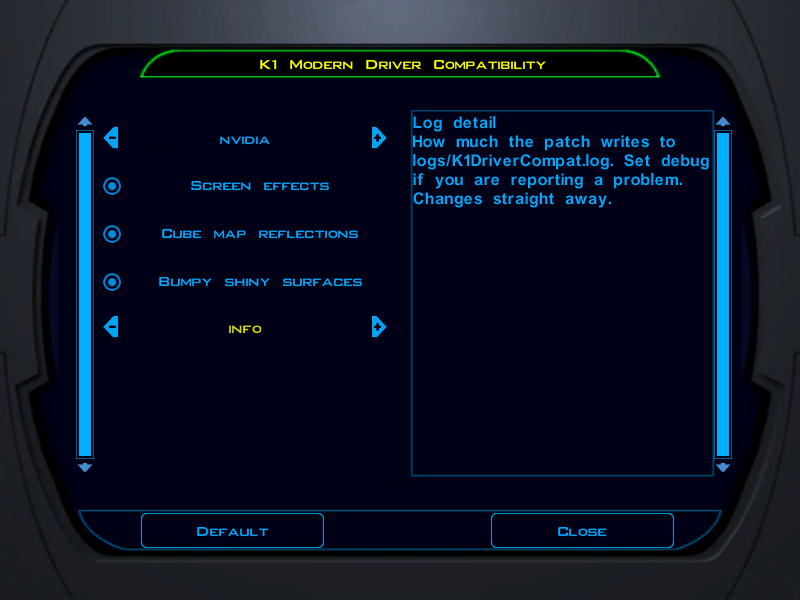
The patch writes the two menus into the Mod Options folder each time the game starts, when
Mod Options is installed.
A menu finds a setting in the file only below the [K1DriverCompat] line, and only when the
setting has no spaces around its =. If you edit the file by hand, write settings as the
examples in this page and in the file do.
A file written by a version before 2.0.0 has no [K1DriverCompat] line. The first time you
open a menu, Mod Options adds that line at the end of the file, with the menu’s settings at
their defaults below it. The patch reads the file from top to bottom, and a later line replaces an
earlier one, so those defaults replace any settings you made higher up. To keep your settings,
make them again in the menu.
Change a setting for one run
To try a setting once without editing the file, set an environment variable with the same name
and the prefix K1DC_, for example K1DC_LOOK=ati. If a setting is in both places, the
environment variable takes precedence.
Check that a setting took effect
If you mistype a value, the patch keeps the default and writes a warning to the log. The
exception is disable_modes: the patch skips any entry that isn’t a mode number, without a
warning.
To see which settings the patch used, find the settings line near the top of the log. It lists
every setting that isn’t at its default, including the modes in disable_modes.
Settings for everyday use
| Setting | Effect |
|---|---|
look=ati | Uses the Radeon look instead of the GeForce look. For more information, see Choose between the two looks. |
log=debug | Writes much more detail to the log. Set this if you’re reporting a problem. |
Settings for finding a fault
Most of these settings turn off part of the patch. If the problem goes away with one of them,
the part that setting turns off is the cause. warm and frames turn nothing off: they measure.
| Setting | Effect |
|---|---|
decline=on | Answers the game’s startup question with no, so the game takes the path it takes on a driver that offers neither of its shading methods. This isn’t the same as the unpatched game. For more information, see What decline=on leaves in place. |
framebuffer=off | Turns off the screen effects and soft shadows, and keeps the lighting. |
cubemap=off | Tells the game that cube maps are unavailable, so shiny surfaces use the simpler sphere map reflections. |
bump=off | Turns off bump mapping everywhere: the bump lighting on creatures and surfaces, and the reflections that a bump map bends. Bump mapped surfaces draw flat. |
disable_modes=18,1D | Stops shading particular kinds of surface. The next table lists the modes. |
warm=on | Measures how long your driver takes to prepare the shading programs. Use this to find the cause of a stutter. |
frames=on | Reports the frame rate and how much work the patch did, every 600 frames. When this setting is off, the patch doesn’t count frames. |
disable_modes takes a comma-separated list of mode numbers, as the log names them. The modes
line, which the patch writes when the game’s renderer shuts down, counts the draws of each mode.
With log=debug, the log also names each mode after mode= the first time it’s drawn.
| Mode | Surfaces |
|---|---|
1A | Lightmapped walls and floors, the most common kind |
02 | Flat coloured surfaces |
03 | Surfaces that fade towards a colour with distance |
13 | Reflective surfaces |
14 | Reflective surfaces that also fade into fog |
16 | Reflective surfaces that also have a lightmap, which use three textures |
18 | Reflective surfaces whose normal map bends the reflection |
1D | The setup of the six textures that mode 18 reads |
06 | Bump lighting, on creatures and on bump mapped surfaces |
07 | Bump lighting on surfaces whose bump map is a normal map |
08 | Lightmapped surfaces lit by a bump map light |
09 | Mode 08 with a highlight |
00 | The full reset between draws |
0D, 1C, 20, 25 | The cleanup after the bump, normalisation cube, reflective, and cube texture modes |
When you turn a mode off, surfaces of that kind draw incorrectly. If the fault you’re chasing disappears, it belongs to that kind of surface.
What decline=on leaves in place
decline=on isn’t the unpatched game. It answers only the game’s startup question. The
following parts of the patch stay active:
- The edits to the game’s code that change how the game looks for cube maps and soft shadows, and which branches it takes for bump mapped meshes and creatures, and the edits that remove game calls the driver refuses.
- The parts that answer the game’s normal map question, point the vertex programs of bump mapped surfaces and skins at the patch’s own, and correct the colour channels of TGA normal maps.
To compare with the unpatched game, uninstall the patch.