Choose between the two looks
The game’s two shading methods, ATI’s fragment shaders and NVIDIA’s register combiners, don’t
draw the game identically. The patch includes both versions, called looks, and you choose
between them with the look setting:
look = nvidia    the default
look = ati       what an ATI Radeon of the time showed
How the looks differ
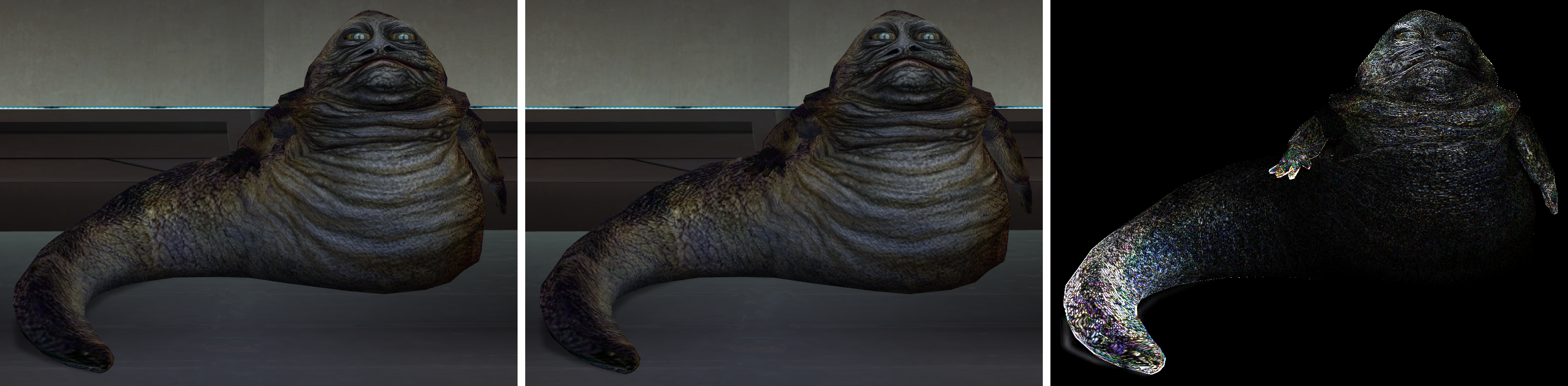
The looks differ in two ways. In the game’s own content both differences are small, and the comparison at the end of this page measures one of them.
Light that adds up past full brightness. Light can add up past full brightness where a lamp shines on a lightmapped surface, or where a reflection sits on top of a lit texture. ATI’s fragment shaders keep the excess and multiply it into the texture, so strong light washes the surface out towards white. NVIDIA’s register combiners limit every step to full brightness, so the same light looks softer. Where light stays under full brightness, which is most of the game’s own lighting, the two looks match.
Highlights on bumpy shiny surfaces. ATI’s fragment shaders square a value without first limiting it to zero or above, which puts a highlight on parts of a surface that face away from the light. The effect shows on bump lit creatures, such as the Hutts in the Taris cantinas, most on the parts that face away from the light. NVIDIA’s register combiners limit the value first, so the GeForce look has no highlight there. They also drop the highlight where the half vector, halfway between the directions to the light and to the viewer, points into the surface.
Neither difference is a bug in the patch. Each look follows its own method, and each carries corrections where the game’s own version was broken.
The Radeon look follows the game’s ATI shaders, except where an ATI shader computes something different from the game’s register combiner setup for the same surface. The combiner setup is what players saw, so the Radeon look follows it there:
- Reflections are added on top of the lit texture, not blended with it.
- Bump lighting keeps two results that the ATI shader computes and then throws away: the
squaring of the highlight, and the light colour. The Radeon look corrects both of its bump
lighting modes,
0x06and0x07, this way.
The GeForce look follows the game’s register combiner setups, with two repairs where the game never finished them:
- The setup for bump lighting with a normal map is unfinished: it computes the lighting in grey, with no texture and no light colour.
- The setup for bump lighting passes one of its inputs in a form that NVIDIA’s driver refuses, so the result depended on whatever an earlier draw left behind. The patch uses the input the game meant.
Rendering the game never ran
The patch also turns on rendering that the shipped game never ran on any card, for mods to use: normal mapped surfaces, bump lighting on lightmapped surfaces, and reflective skins with a flat reflection map. Lighting for mods works explains why they never ran. Nobody saw them drawn, so each look draws them by the same rules, and with the same corrections, as the rest of that look:
- Normal mapped surfaces use mode
0x07, which each look draws the way it draws0x06. - The game has no ATI shader for bump lighting on lightmapped surfaces, modes
0x08and0x09, so both looks use the game’s register combiner setups for them. - The repair for reflective skins with a flat reflection map is to a vertex program, which both looks share.
The default look
The default is the GeForce look, look = nvidia, which follows what NVIDIA’s register
combiners compute, with the two repairs. To use the Radeon look, set look = ati.
Settings explains where to put the setting.